SkeuDesign Figma Plugin
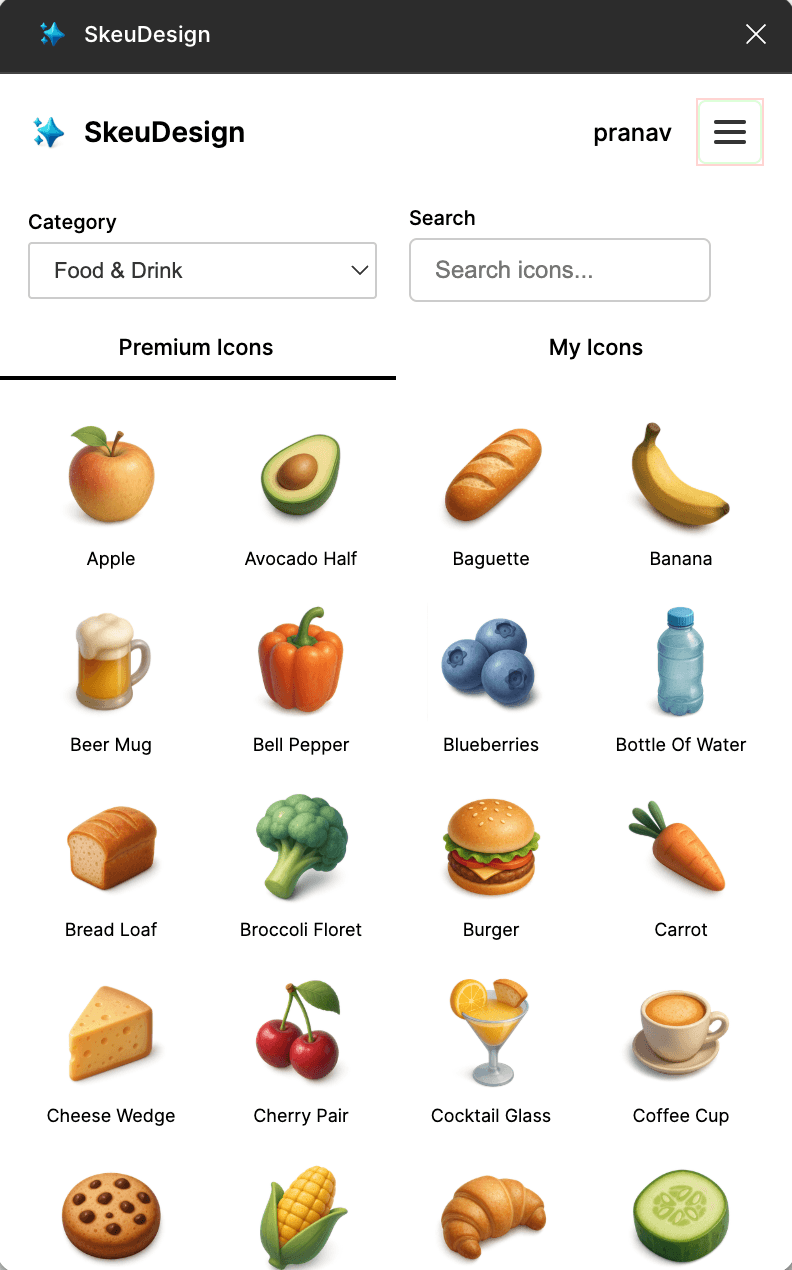
I built the connection between SkeuDesign's icon library and Figma: account-aware browsing, personal icons, and PNG insertion directly into the canvas.
THE BUILD
Built end to end.
I built the plugin and its supporting website API end to end. That includes the interface, Figma sandbox integration, sign-in, library browsing, access checks, session storage, and turning downloaded image bytes into a usable canvas object.
The problem to solve
An icon library is only useful if a designer can move an asset into their working file. The plugin also needs to distinguish an icon someone can preview from one their account can download.
Engineering decisions.
Keep account access on the server
The plugin uses the existing website API for account and library access. Download authorization stays on the server, while the interface shows which icons are included and which are locked. That keeps access decisions consistent with the web product.
Separate the interface from canvas operations
The HTML interface handles browsing and sends image bytes to the Figma sandbox. I use Figma's image API to create an image-filled rectangle, apply the supplied dimensions, name it, and select it on the canvas. The inserted asset is a PNG image.
Keep the plugin focused on the design workflow
Generation and account purchases happen on the website. The plugin brings library and personal icons into the current design file, so the two surfaces share a product without duplicating every screen.
STACK
FEATURES
What it does.
- 01Browse icon collections with search and category filters
- 02Distinguish included icons from locked library previews
- 03Access personal icons created on the SkeuDesign website
- 04Insert PNGs at the dimensions supplied by the API
- 05Open the website for image generation and account purchases